
Featured Site
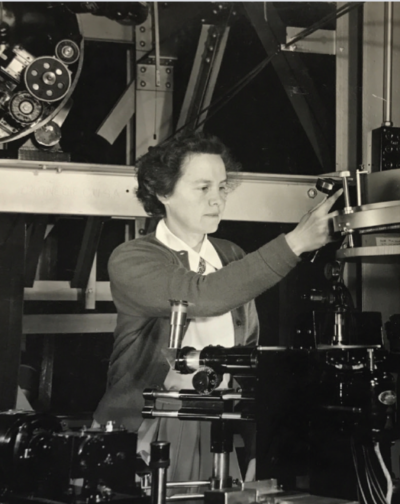
Beyond the Horizon
This student-created digital exhibit showcases the lives of early women astronomy students at the Detroit Observatory. These pioneering women left a legacy that is as big as the cosmos itself.
Learn more
News
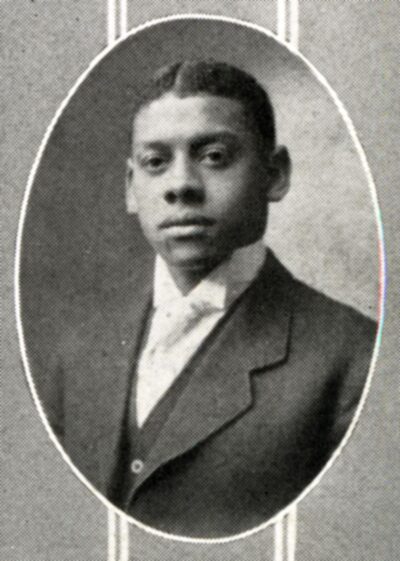
Strong as Steel
Cornelius L. Henderson was a pioneering steel engineer and architect who helped construct two of the major Great Lakes bridge crossings between the United States and Canada.
Complete Story
Stay Connected

Can you guess where this picture was taken? 🗽
⭐ If you guessed Detroit, you’re right!
Throwback to 1918, when this 60-foot-tall plaster replica of the Statue of Liberty was brought to Cadillac Square as part of a push for Liberty Bonds during World War I!
According to the Detroit Free Press, “elaborate plans” were made for “nightly pageants” around the statue, as the government tried to convince citizens to buy Liberty Bonds.
The “official yell-master and pep man” for Detroit’s Liberty Bonds was U-M alum J. Fred Lawton, who led Detroit crowds in singing “campaign songs” around this statue with his megaphone. 📣🎵
You can find more photos of historic Detroit Liberty Bond rallies like these in the George W. Merrill photographs, and in the J. Fred Lawton papers.
#TBT #Detroit #WorldWarI #CadillacSquare #StatueOfLiberty #LibertyBonds #MichiganHistory #DetroitHistory


Can you guess where this picture was taken? 🗽
⭐ If you guessed Detroit, you’re right!
Throwback to 1918, when this 60-foot-tall plaster replica of the Statue of Liberty was brought to Cadillac Square as part of a push for Liberty Bonds during World War I!
According to the Detroit Free Press, “elaborate plans” were made for “nightly pageants” around the statue, as the government tried to convince citizens to buy Liberty Bonds.
The “official yell-master and pep man” for Detroit’s Liberty Bonds was U-M alum J. Fred Lawton, who led Detroit crowds in singing “campaign songs” around this statue with his megaphone. 📣🎵
You can find more photos of historic Detroit Liberty Bond rallies like these in the George W. Merrill photographs, and in the J. Fred Lawton papers.
#TBT #Detroit #WorldWarI #CadillacSquare #StatueOfLiberty #LibertyBonds #MichiganHistory #DetroitHistory
Happy National Library Week! ⭐
Did you know that there are libraries on campus containing sheet music, or computer games, or ancient papyrus? 🤯
U-M has at least 20 different libraries, all of them with their own specialties and types of collections, including the Bentley! 📚📖💙
At the Bentley Historical Library we really love helping people dive into the history of U-M, and the state of Michigan, with things like:
📖 Scrapbooks from students long ago!
📸 Photographs of what your dorm looked like when it was first built!
🗺️ Old maps of the state of Michigan!
📽️ Videos of U-M weather experts sailing past icebergs!
🏈 Boxes full of football play-by-play game rundowns!
…And more!
Sometimes visitors see the word “library” on the Bentley’s sign, and assume our stacks are full of books.
We love books, and the Bentley contains plenty of them. But the truth is, we also have so much more to share!
We encourage you to come visit our Reading Room to find out more, and to check out U-M’s many libraries, to see everything they have to offer!
Click through to glimpse historic photos of just a few of the many wonderful libraries on U-M`s campus.
How many of them can you recognize?
#NationalLibraryWeek #Libraries #UMich #GoBlue #ReadingIsCool #SupportYourLocalLibrary

Happy National Library Week! ⭐
Did you know that there are libraries on campus containing sheet music, or computer games, or ancient papyrus? 🤯
U-M has at least 20 different libraries, all of them with their own specialties and types of collections, including the Bentley! 📚📖💙
At the Bentley Historical Library we really love helping people dive into the history of U-M, and the state of Michigan, with things like:
📖 Scrapbooks from students long ago!
📸 Photographs of what your dorm looked like when it was first built!
🗺️ Old maps of the state of Michigan!
📽️ Videos of U-M weather experts sailing past icebergs!
🏈 Boxes full of football play-by-play game rundowns!
…And more!
Sometimes visitors see the word “library” on the Bentley’s sign, and assume our stacks are full of books.
We love books, and the Bentley contains plenty of them. But the truth is, we also have so much more to share!
We encourage you to come visit our Reading Room to find out more, and to check out U-M’s many libraries, to see everything they have to offer!
Click through to glimpse historic photos of just a few of the many wonderful libraries on U-M`s campus.
How many of them can you recognize?
#NationalLibraryWeek #Libraries #UMich #GoBlue #ReadingIsCool #SupportYourLocalLibrary
Happy National Pet Day! 🐶🐱💙
Click through to see pets from Michigan history, and the people who loved them.
Proof that the bond between a human and their pet is truly timeless! 🐾
📸: Dog and little girl in Chelsea, Michigan, from the Thomas Shaw papers
📸: Cat and boy, from the Emile Low scrapbook
📸: Girl with rabbits, from the Squier Family papers
#NationalPetDay #PetsOfInstagram #OldPhotos #Dog #Cat #Rabbits

Happy National Pet Day! 🐶🐱💙
Click through to see pets from Michigan history, and the people who loved them.
Proof that the bond between a human and their pet is truly timeless! 🐾
📸: Dog and little girl in Chelsea, Michigan, from the Thomas Shaw papers
📸: Cat and boy, from the Emile Low scrapbook
📸: Girl with rabbits, from the Squier Family papers
#NationalPetDay #PetsOfInstagram #OldPhotos #Dog #Cat #Rabbits
On this day in 1899, “The Victors” was played for the very first time! 🥳
“Hail to the victors valiant, hail to the conquering heroes…” 🎵
You’ve probably heard U-M’s iconic song, “The Victors,” played at football games before. 🏈
But did you know that it was inspired by one?
In 1898, U-M student Louis Elbel watched the Wolverines defeat the Chicago Maroons 12 to 11, ending a victorious football season!
Elbel was so inspired by the game that, on the train ride back to Ann Arbor, he worked on writing a song that would soon be known as “The Victors.” 🚂
On April 5, 1899, according to the Michigan Daily, a student orchestra led by Elbel played “The Victors” for the very first time in public, as part of a student play titled, “A Night Off.”
The audience loved it so much, they asked for an encore.
Little did they know that this song was history in the making, soon to be beloved by fans around the world!
If you’re curious to learn more about that first performance of “The Victors,” check out the Michigan Daily Digital Archives.
Be sure to also check out @umichband to watch a video of the band playing “The Victors” in the modern day! 🎺
#OTD #UMich #GoBlue #Wolverines #TheVictors #LouisElbel #MarchingBand #FootballHistory

On this day in 1899, “The Victors” was played for the very first time! 🥳
“Hail to the victors valiant, hail to the conquering heroes…” 🎵
You’ve probably heard U-M’s iconic song, “The Victors,” played at football games before. 🏈
But did you know that it was inspired by one?
In 1898, U-M student Louis Elbel watched the Wolverines defeat the Chicago Maroons 12 to 11, ending a victorious football season!
Elbel was so inspired by the game that, on the train ride back to Ann Arbor, he worked on writing a song that would soon be known as “The Victors.” 🚂
On April 5, 1899, according to the Michigan Daily, a student orchestra led by Elbel played “The Victors” for the very first time in public, as part of a student play titled, “A Night Off.”
The audience loved it so much, they asked for an encore.
Little did they know that this song was history in the making, soon to be beloved by fans around the world!
If you’re curious to learn more about that first performance of “The Victors,” check out the Michigan Daily Digital Archives.
Be sure to also check out @umichband to watch a video of the band playing “The Victors” in the modern day! 🎺
#OTD #UMich #GoBlue #Wolverines #TheVictors #LouisElbel #MarchingBand #FootballHistory